

Live demo
See the outfit on yourself first
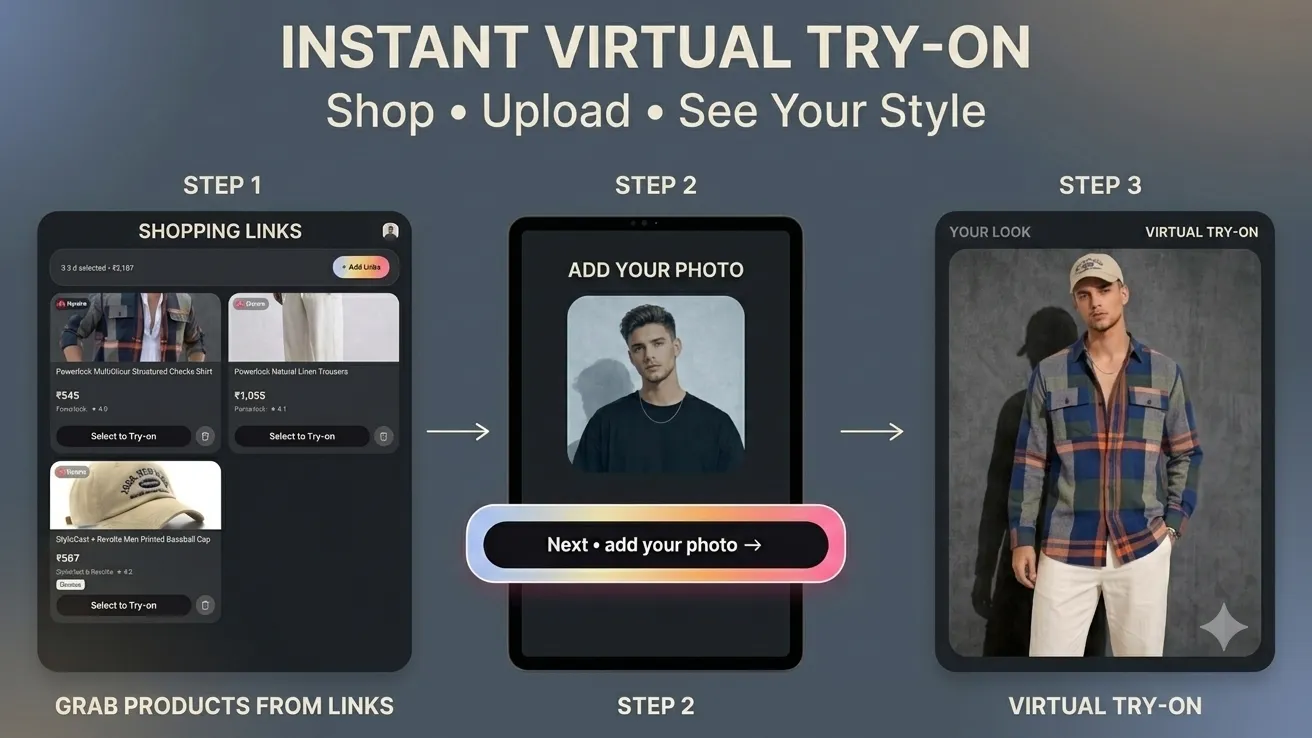
A shopper uploads one photo and sees how an outfit looks on them — this one is a showcase, built to answer what an equivalent inside your own store could do.
Open the live demo- One uploaded photo, no measurements needed
- AI image generation, not a pasted-on cut-out
- The garment stays recognisable in the result
- Built to sit inside an eCommerce product page
- Runs in a browser, nothing to install
What a product photo cannot tell a shopper
Every garment online is worn by someone who is not the person buying it. The shopper guesses, orders two sizes, and posts one back — and in clothing that guess is expensive on both sides of the transaction.
This is a showcase, not something you can buy from us. We built it to find out whether AI image generation is good enough yet to answer that question for a real shopper, and to have something concrete to point at. The version worth discussing is the one wired into your catalogue.
What you can try
What the demo actually lets you do
The demo is live, so this section is a list of things to go and do rather than claims to take our word for. Use a photo of yourself, not a stock one.
Upload your own photo
You give it one photo of yourself. That is the entire setup, with no measurements to type in and no body scan to sit through.
Put an outfit on it
Choose a garment and it generates you wearing that piece, so the question stops being whether it suits the model in the catalogue shot.
Generated, not pasted on
The image comes from an AI image model rather than a cut-out laid over your photo, so the garment sits on you instead of in front of you.
Check it against the real product
The output keeps the garment recognisable, which is the whole test: a shopper has to be judging your actual product, not a rough impression of it.
Try several outfits on one photo
Nothing stops you running the same photo against outfit after outfit, which is the comparison a shopper makes standing at a rail in a shop.
Imagine it on a product page
It was built for eCommerce integration, so picture this flow sitting on your own product page rather than as the separate site you are looking at.
What you get
What an equivalent would give you
This demo is ours. The list below is what would exist on your side if we built the version that runs against your own products.
- THE FEATURE
- Try-on running on your own catalogue
- The same flow, but generating your garments on your customers, hosted on your infrastructure and sitting inside the product page you already have. Not a separate site anyone has to go and visit.
- THE CODE
- Source, prompts and deploy pipeline
- In your Git organisation, including the image pipeline and the model configuration. Another team can change which garments are eligible, or swap the image model, without booking time with us.
- A CATEGORY VERDICT
- Which of your garments this works on
- A written read on what generated convincingly and what did not. Some categories come out well and some are not there yet, and you should have that list before a budget is committed.
- RUNNING COSTS
- The per-image number, in writing
- Generated images are billed per picture, so cost tracks how often shoppers press the button. You get that figure and the caching plan that keeps it down before you sign anything.
How we work
What building your version looks like
Durations below are typical for a first build. The second step exists so a no can arrive in week two rather than month three.
Open the demo
10 minutesUpload a photo and put a few outfits on it. You will have an opinion about whether this is good enough for your customers faster than any deck.
Test it on your catalogue
1–2 weeksWe run your real garments through it and show you the raw output, good and bad. It is a cheap fortnight, and it sometimes ends the conversation there.
Build and integrate
6–10 weeksThe try-on flow on your product pages, wired to your catalogue, with the image pipeline, the moderation step and a fallback for when generation fails.
Run and tune
OngoingWatching which garments shoppers actually try on, bringing the per-image cost down, and retiring the categories where the output never convinced anyone.
Is this worth a conversation for you?
Worth reading before you get in touch — it saves both of us a call.
A good fit if…
- You sell clothing online and shoot it on models
- Returns because it did not look like that are a real cost
- You control your product pages and can add to them
- You will judge the output honestly, garment by garment
Probably not, if…
- You still need the online store built — see Web & SaaS Platform Development
- It has to live inside a native shopping app — see Mobile App Development
- You want size advice from measurements, not a picture — see AI-Integrated Software
- Your products are not worn on a body — furniture, jewellery, hardware
Frequently Asked
Questions
Common questions about cost, customer photos and putting AI try-on on a real product page.
Three things, mostly. How many garments have to work: one category is a pilot, a whole catalogue is a data problem. Whether it plugs into a store you already run, or one that has to be built first. And how good the output has to be before you will put it in front of a customer, because that last stretch of quality is where most of the time goes. We scope against your actual catalogue before quoting, so the number is not a guess.
Generated images are billed per picture, so your running cost follows how often shoppers press the button rather than how many visitors you get. Caching helps, because the same garment on the same photo does not need generating twice. Beyond that you need somewhere to store the images, a moderation step, and someone who occasionally looks at what came out. It is not a system that needs a full-time operator, but it is not fire-and-forget either.
They are photographs of people, which makes them among the more sensitive things a store can end up holding. So retention becomes a decision you make deliberately rather than a default: how long an uploaded image survives, whether the generated version is kept, what the customer is told before they upload, and which region it is stored in. In several markets that last one is a legal question, not a preference. We scope it at the start, because retrofitting a deletion policy is unpleasant.
It will, sometimes. Unusual poses, busy backgrounds and certain fabrics all produce results a shopper would not accept. The design answer is that try-on is never the only thing on the page. Your normal product photography stays, the generated image is offered alongside it, and a failed generation falls back quietly instead of showing something odd. A human review step can sit in front of publishing if your risk tolerance is low. What you should not do is make the generated image the only view of the product.
There is nothing to buy here, so there is nothing fixed. This demo is a showcase; what we would build for you is new software that borrows the approach. Your branding, your catalogue, your product page layout, your choice of image model and your rules about which garments are eligible are all decisions made during the build. If your requirements sit far enough from this, we will say so rather than bending the demo into a shape it was not built for.
Have a project in mind?
Fixed price after a paid discovery — no hourly billing. A real engineer reads every enquiry, and we reply within 24 hours.