Tween Pro
Turn a live product UI into a cinematic demo
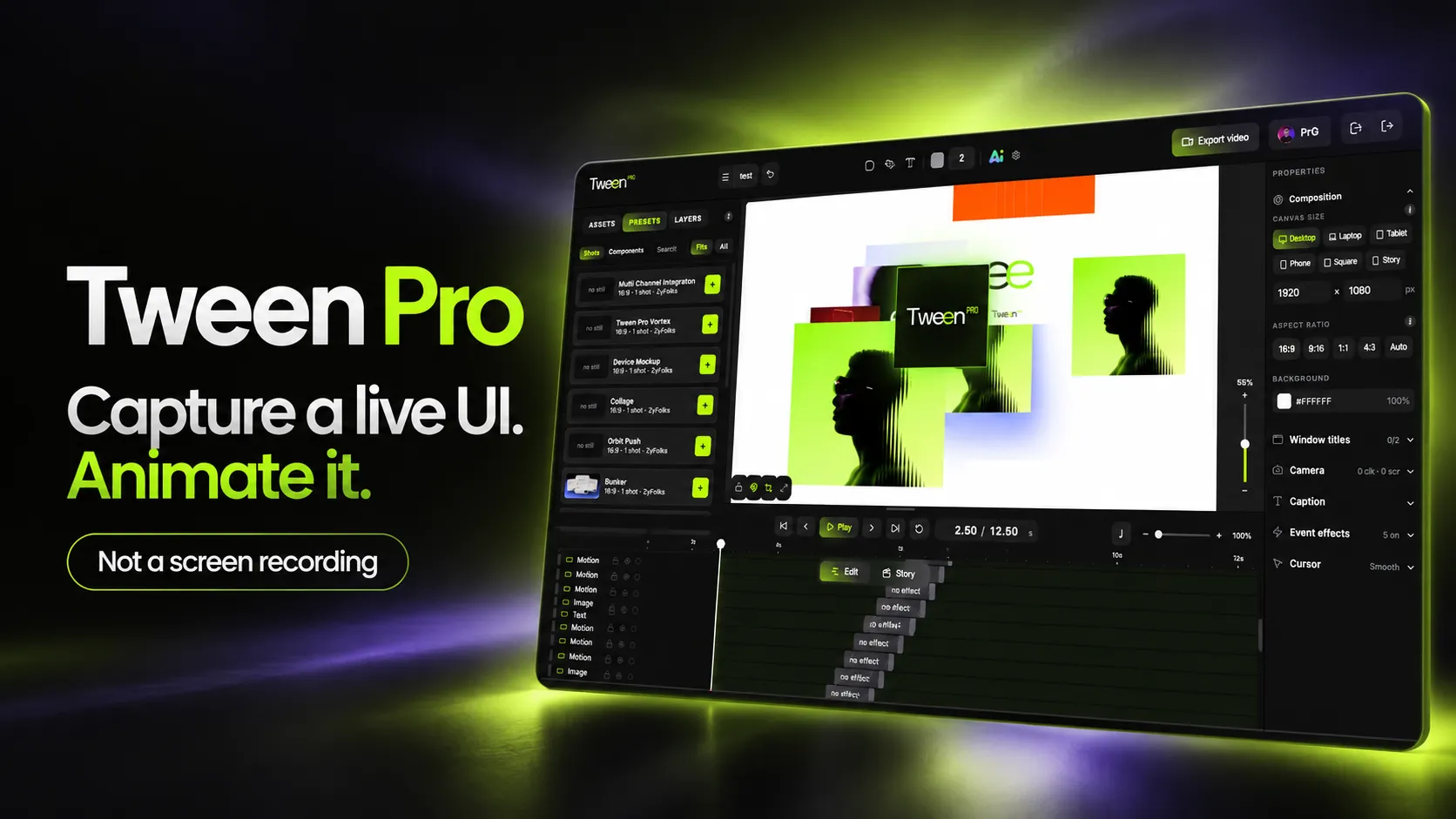
Tween Pro captures a real web interface, rebuilds it as editable layers, and animates it with a camera, motion and sound. Nothing is a screen recording, and every frame stays editable.
Open Tween Pro- Captures the real interface, not a video of it
- Every element stays an editable layer
- A virtual camera with depth of field
- Exports MP4 or WebM, with audio
- Free during Alpha, Google sign-in
Why every product demo is a compromise
A team that needs a demo video has three options. Screen-record the app, and it looks like a screen recording: a jittery cursor, no camera, and a full re-record the moment the UI changes. Rebuild the UI in a motion tool, and it costs a designer days, then drifts out of date. Or use a generative video tool, which produces something that looks like software but is not yours.
Tween Pro sits in the gap: the fidelity of a screen recording with the control of a motion-graphics tool. Because the result is layers rather than pixels, the demo is a document. Re-time it, swap a headline, change the aspect ratio, or re-capture one screen after a redesign, without starting over.
What you can try
What you can do in Tween Pro
All of it is in the live studio during Alpha. Start by capturing a screen of your own product. Everything else builds on that.
Capture an element, a page or a flow
Pick one section, freeze a whole page, or record a multi-page flow. Clicks, scrolling and typing land on the timeline as shots, cursor path included.
Explode it into layers
Take a captured element apart into individually editable layers, then move, restyle or swap any of them for new content.
Direct a real camera
A virtual camera with shots, keyframes, parallax and depth of field. Focus can follow the cursor to the exact thing it just clicked.
Work on a proper timeline
Millisecond zoom, markers, a loop region, multi-select and group drag, per-track lock and solo, and undo across every drag.
Add procedural motion
20 motion components, from particles and orbits to waves, grids and shape morphs, each with its own parameters. Draw a path and send anything along it.
Animate the type
42 text motion systems across nine categories, from word cascades to kinetic reveals and number counters, using the fonts installed on your machine.
Mask it and light it
Live editable mattes, progressive blur, glass and liquid-glass effects, and a light rig. Device mockups put a screen on a real display plane.
Score it to sound
Entrance and exit sound effects suggested per layer, and a beat analyser that snaps motion to a music track's grid.
Let AI direct, then take over
Story mode turns a prompt into a multi-scene sequence made of editable layers. Bring your own key: Anthropic, OpenRouter or a local model.
What you get
What Tween Pro gives a product team
This is our own product rather than a client build, so what follows is what you get from using it, not what an engagement delivers.
- YOUR REAL PRODUCT
- The actual interface, at full fidelity
- Captured from the live page with its real styles and fonts, so the viewer is looking at the thing they will use, not a drawing of it.
- A DOCUMENT, NOT PIXELS
- Changes without a re-shoot
- When one screen changes after a redesign, re-capture that screen. When marketing wants a different headline, change the text layer. The rest of the video stays as it was.
- EVERY PLACEMENT
- One demo, several aspect ratios
- 16:9 for YouTube, square for LinkedIn and vertical for Reels from the same project, by changing the canvas rather than starting again.
- FREE DURING ALPHA
- Real limits, no price yet
- Sign in with Google and make up to 5 projects with 500 MB of assets. Projects sync to the cloud with version history, so they open on any machine.
How it works
From a live page to an exported video
Tween Pro runs in the browser. The only thing to install is the capture extension.
Capture
Chrome extensionFreeze one element, a whole page, or a recorded multi-page flow, inside the page itself, where its real styles and fonts can be read.
Rebuild
AutomaticThe studio rebuilds the capture as a layer tree in an isolated renderer. Not an image of the UI: every node can be selected and moved.
Direct
In the studioTimeline, keyframes, camera moves, procedural motion, kinetic type, masks, effects and sound.
Export
MP4 or WebMExport a video file with audio, or publish a link that plays in any browser.
Is Tween Pro right for you?
Worth reading before you sign in. Alpha has real limits.
A good fit if…
- You need launch or feature videos for a web product
- Your product changes often and its demos go out of date
- You want the same demo in several aspect ratios
- You work in desktop Chrome or Edge
Probably not, if…
- The product is a native mobile or desktop app, not a web UI
- Most of the screen is canvas, WebGL or video content
- You need shared team workspaces. It is single-user today
- You want a custom tool like this built for you — see Web & SaaS Platforms
Frequently Asked
Questions
Common questions about Alpha limits, what you need, the AI and what it can capture.
Yes, during Alpha. It is open to anyone with a Google account, with real limits: 5 projects per account, 500 MB of stored assets and 25 MB per upload. There is one plan and it is free. More project space will come with future plans, and nothing about those plans has been decided yet, so there is no price to quote.
No. No video of the source page is ever taken. A browser extension freezes the live interface, the studio rebuilds it as a tree of real layers, and you animate those layers. That is why a Tween Pro project stays editable: you can re-time it, swap a headline, change the aspect ratio, or re-capture one screen after a redesign without starting again. A screen recording is pixels; a Tween Pro project is a document.
A desktop Chromium browser (Chrome or Edge), a Google account to sign in, and the capture extension. The extension is not in the Chrome Web Store yet, so for now it is installed with Chrome's developer mode (Load unpacked). A published piece is different: it plays in any browser, so the people you share it with need nothing.
No, and that distinction is the point. Your real interface is the footage. The AI helps with creative direction: Story mode takes a prompt and proposes a multi-scene sequence, and a panel shows what it decided so you can lock the parts you want to keep. Its output is always editable layers, never a rendered clip. You bring your own key for Anthropic, OpenRouter or a local model, and the key stays encrypted in your browser.
It works on real product UIs, which is what it is built for. Some content does not fully reconstruct: pages with a strict content security policy, closed shadow DOM, canvas or WebGL content, and embedded video. Images behind sign-in or on another origin are fetched again at playback, so they can fail in a shared piece.
Video with audio, as WebM (VP9 and Opus) or MP4 (H.264 and AAC), at the canvas size and aspect ratio you set. Or publish the project to a public link that plays in any browser and appears in the showcase, where others can watch it or open a copy in the editor.
Have a project in mind?
Fixed price after a paid discovery — no hourly billing. A real engineer reads every enquiry, and we reply within 24 hours.