

Zybo AI
Your documentation, answering your customers
Zybo turns your help docs into a chatbot that answers with a confidence score, then hands the conversation to a human agent the moment it is out of its depth.
Try Zybo free- Answers built from your own documents
- A confidence score on every reply
- Escalation into a human agent inbox
- One script tag to install the widget
- Free tier forever, no credit card
The questions your team answers twice a day
Most support queues are full of questions the answer already exists for — in a PDF, a help page, a policy doc nobody outside the team can find. Customers ask anyway, and someone types the same reply for the fourth time that week.
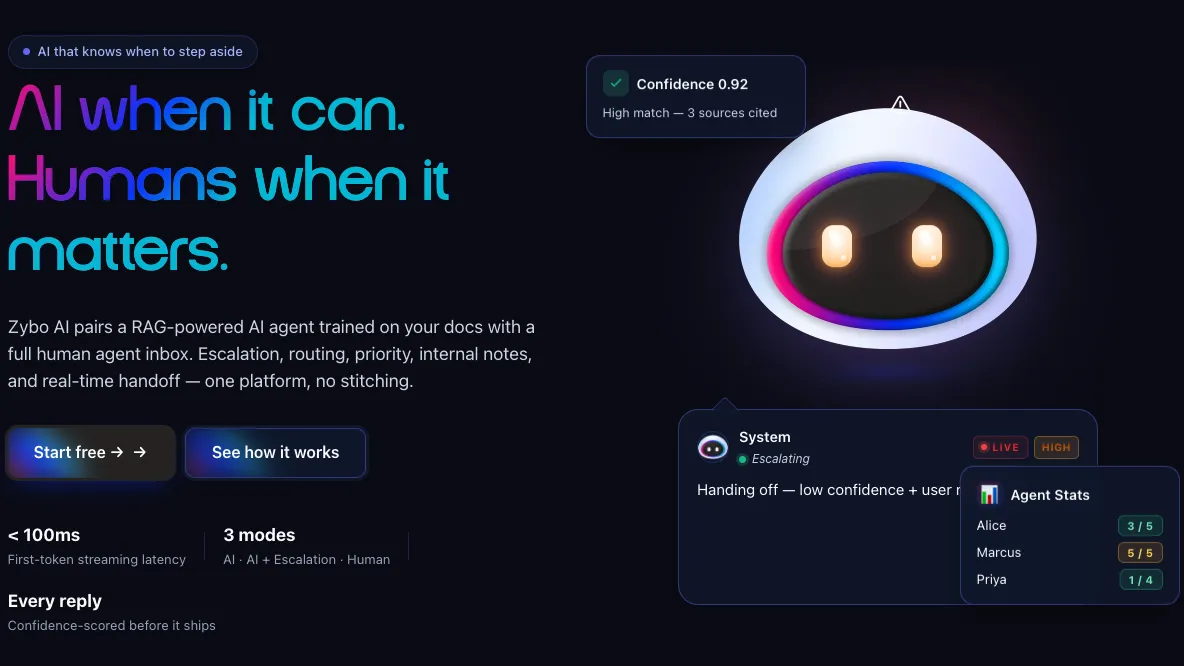
The usual fix is a bot that answers everything with the same certainty, including the questions it should never have touched. Zybo scores its own confidence and steps aside when that score is low, so the cases that need a person reach one instead of a dead end.
What you can try
What you can do in Zybo
All of it is in the live product on the free tier. The first item is the one that decides whether the rest are any good, so start there.
Build the knowledge base
Upload PDFs, Markdown, CSV, JSON or plain text, or give it your website URL and let it crawl the pages you already publish.
Search that finds the passage
Hybrid semantic and keyword search with reranking, so a customer asking in their own words still lands on the paragraph that answers them.
See how sure it is
Every reply carries a score for how well your documents actually supported it, so a shaky answer is visible rather than merely confident-sounding.
Decide how much AI handles
Run it as AI Only, AI plus escalation, or Human Only — and change your mind once you have read a week of real transcripts.
Escalate on purpose
Low confidence hands the thread over on its own. A customer can ask for a person at any point, and a supervisor can pull a conversation across.
Work the agent inbox
Agents claim a conversation, reassign it, or release it back to the queue, so two people never end up answering the same customer.
Give agents a copilot
Even on a human-handled thread, Zybo drafts a suggested reply from your documents. The agent edits it, sends it, or ignores it entirely.
Put the widget on your site
One script tag. Replies stream as they are generated, with the first token under 100ms, so nobody sits watching a spinner.
Answer from your phone
Agent apps for iOS and Android, so an escalated conversation does not wait because everyone left the office. WhatsApp, Instagram and Messenger are coming.
What you get
What Zybo gives a support team
This is our own product rather than a client build, so what follows is what you get from using it, not what an engagement delivers.
- DEFLECTED QUESTIONS
- The repeat questions answered without you
- Anything already covered in your documentation gets answered from those documents, at whatever hour it arrives. What reaches your team is the smaller pile that genuinely needs judgement.
- A CLEAN HANDOFF
- Escalations that arrive with context
- When the AI steps aside, the agent picks up a thread they can read rather than asking the customer to start again. Claim, reassign and release keep ownership of it unambiguous.
- VISIBLE UNCERTAINTY
- A confidence score you can act on
- Every reply is scored against how well your documents supported it. That shows you where the documentation is thin, so you fix the source instead of patching the bot with special-case rules.
- NO SETUP BILL
- A free tier with no card required
- Create an account at app.zybo.ai, load a document and put the widget on a staging page before anyone has to approve a budget. Paid plans matter later, once you have outgrown it.
How it works
From a folder of docs to a live widget
Zybo is a live product, so this is what your own setup looks like rather than a project plan. Only the second step involves real work.
Sign up
5 minutesCreate an account at app.zybo.ai on the free tier. No card, and no scheduled sales call before you are allowed to look at the thing.
Feed it your documents
An afternoonUpload the PDFs and help pages you already wrote, or hand over your website URL and let it crawl. Existing material is usually enough to begin.
Test and set the escalation rules
1–2 weeksAsk it what your customers actually ask, read the confidence scores that come back, and set the level at which a conversation should go to a person.
Go live and keep reading
OngoingDrop the script tag on your site, put agents in the inbox, and treat the low-confidence threads as a list of documentation still to write.
Is Zybo right for you?
Worth reading before you sign up — it saves you an afternoon.
A good fit if…
- You answer the same questions repeatedly from documents you already have
- Some conversations genuinely need a person and you want that route clear
- You want to try it before involving procurement or a budget
- You can get a script tag onto your website
Probably not, if…
- The bot must issue refunds or update your CRM — see AI Agents
- You need this intelligence inside your own product — see AI-Integrated Software
- The work is document processing and routing, not chat — see AI Automation
- There is no written documentation yet for it to answer from
Frequently Asked
Questions
Common questions about cost, setup, data and what happens when the AI is unsure.
The free tier is free forever and does not ask for a card, so the first test costs nothing but your own time. Beyond that, the two things that move the bill are conversation volume and how much material sits in the knowledge base. Neither arrives as a surprise, because both are things you can watch before you commit to anything. If you would rather not pay per conversation and want the whole system running on your own infrastructure, that is a build rather than a signup, and Zyfolks quotes it separately.
Signing up takes minutes. The real work is the knowledge base, and for most teams that means an afternoon of uploading the PDFs and help pages you already wrote, or pointing Zybo at your site and letting it crawl. Installing the widget is one script tag. The part worth not rushing is testing: ask it the questions your customers genuinely ask, read the confidence scores that come back, and set the escalation threshold from what you saw rather than from whatever the default happens to be.
Zybo answers from the documents you give it and nothing else, so the scope of what it knows is a scope you set. Upload a PDF and it becomes part of the knowledge base; remove that document and answers stop drawing on it. Conversations are stored so an agent can read the history when a thread is escalated to them. If your sector rules out sending support content to a hosted service at all, say so early — a self-hosted build is a different conversation, and Zyfolks handles those under AI Agents.
It will get some wrong, which is exactly why every reply carries a confidence score instead of a uniformly confident tone. Low confidence hands the conversation to a human automatically, and a customer can ask for a person at any point without having to argue with a bot first. A supervisor can also pull a thread across mid-conversation. If you are not ready to trust it in public yet, run Human Only mode and let the AI copilot draft replies your agents edit before sending. Nobody outside ever sees a draft you rejected.
Inside the product you choose the mode, the escalation rules and what goes into the knowledge base, and the widget sits on your own site behind one script tag. What Zybo will not do is act in your other systems: it answers and it escalates, but it does not issue the refund or update the CRM record. If that is your actual requirement, you want an agent built around your APIs, which is a Zyfolks AI Agents engagement rather than a Zybo signup. Better said now than after you have wired it in.
Have a project in mind?
Fixed price after a paid discovery — no hourly billing. A real engineer reads every enquiry, and we reply within 24 hours.