


Zyfin
Know what's safe to spend, every single day
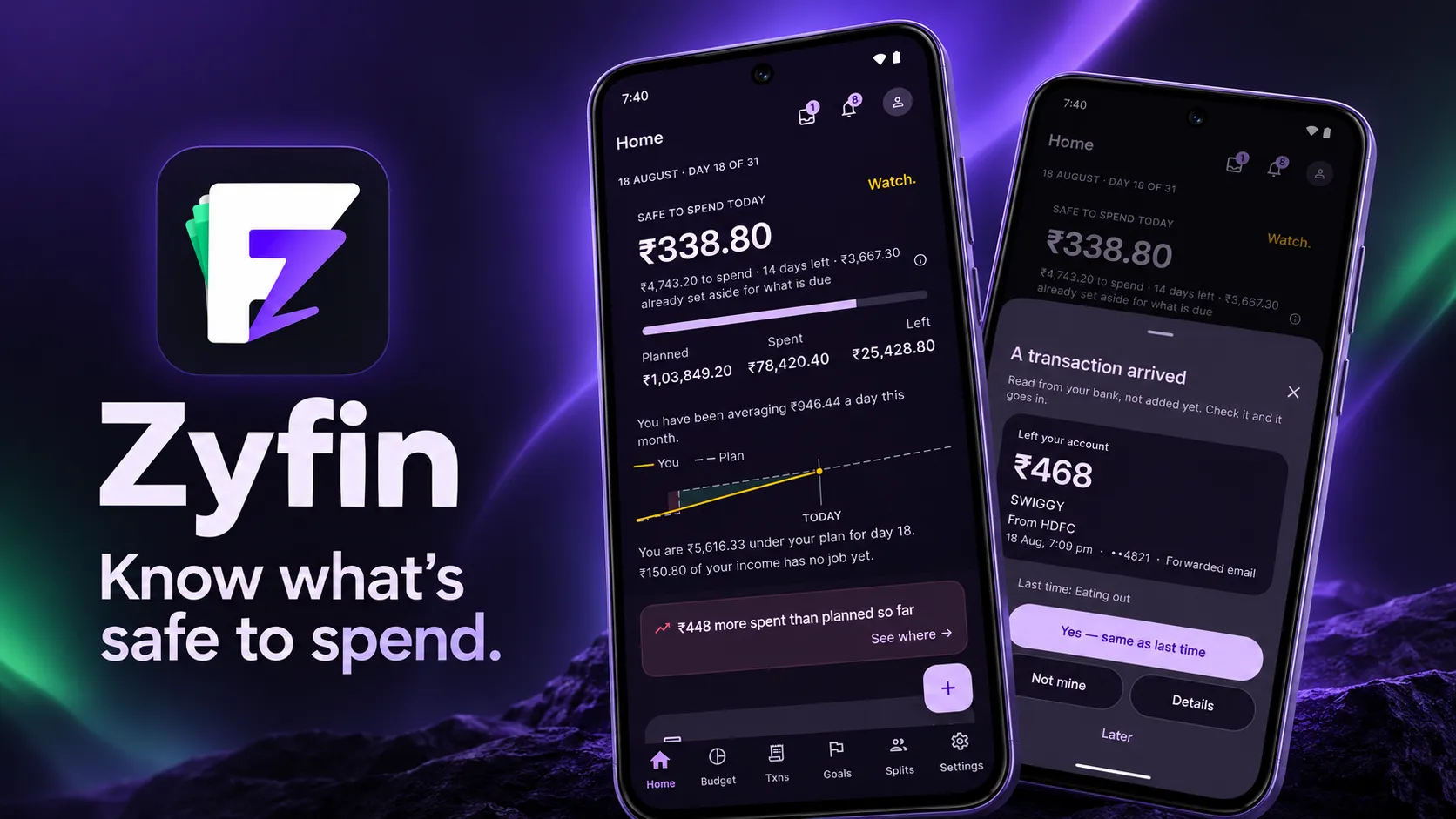
Plan your month once. Zyfin turns your bank's alert emails into transactions, files each one against the plan, and gives you one number: what you can spend today without breaking the rent, the EMIs or the SIPs.
Get Zyfin- One number: safe to spend today
- Bank alert emails become transactions
- No SMS access, no ads
- Encrypted on your phone, works offline
- Free to download on Google Play
Why a budget app usually tells you too late
Most budget apps report what already happened, so you find out the month went wrong in its last week, after the money is gone. And the number your bank shows you is a balance, which still includes the rent due on the 5th and the EMI due on the 12th.
Zyfin starts from a plan instead: what comes in, what has to go out, and what you want to save. Each payment is matched against that plan as it arrives, so the number on the home screen already knows what is due, and you hear about a budget while it is running out rather than after. It gets there without asking to read your SMS.
What you can try
What you can do in Zyfin
All of it is in the app on Google Play, and none of it needs an account. Start with the first item. It is the number you will open the app for.
Safe to spend, today
One number that already knows the rent is due on the 5th and the EMI on the 12th, so it never tells you money is free when it isn't.
Plan every rupee
Rent, EMIs, SIPs, bills, spending limits, goals and money set aside, planned once. Each month is generated from it, with what's left over in plain sight.
Bank alerts become cards
Forward your bank's alert emails and each payment arrives as a card. Tap Yes, that was me, and it lands on the right line of your plan.
Statements and bills, too
Import the password-protected statement PDFs your bank emails. Zyfin usually works out the password from your profile. Or photograph a bill.
Warned before, not after
A heads-up while a budget is running out, and a warning when an account is short for a bill that is coming up.
Splits that settle themselves
Split a bill with friends. When their repayment lands in your bank, Zyfin offers to close it. Only your share counts, and they don't need the app.
Credit cards, handled
A card is a real account: what you owe now, the statement date, what's due and when, and each card EMI counted down to its last instalment.
Goals and freed-up money
Track what you're saving for. When an EMI is about to finish, Zyfin shows what it frees each month and offers to put it toward a goal.
Offline first, two phones later
Works with no account and no network. Sign in, with Google if you like, to back it up and keep a second phone in step.
What you get
What Zyfin gives you each month
This is our own product rather than a client build, so what follows is what you get from using it, not what an engagement delivers.
- A DAILY NUMBER
- What's safe to spend, today
- Not your balance. The money left after everything already planned for the month, spread over the days that remain, so a healthy-looking balance in week one cannot fool you.
- LESS TYPING
- Payments that arrive on their own
- Forwarded bank alerts turn into cards you confirm with a tap, and a payee you have filed before is offered the same category next time. A statement import clears the backlog.
- NO SURPRISES
- Warnings while there is still time
- A heads-up while a budget is running out, what is coming up next, and a note when an account is short for a bill. The month stops going wrong in its last week.
- NOTHING TO SELL
- Your money stays your business
- No SMS permission, no mailbox access, no ads and no trackers. The budget is encrypted on your phone with a key in its secure hardware, and one step deletes everything.
How it works
Set up in minutes. Stays up to date on its own.
No bank passwords, no SMS permissions and no reading your inbox. You choose what Zyfin sees.
Tell it where your money lives
A minuteTap the banks you use and what lands in them each month, so the plan starts from real numbers.
Plan the month
OnceAdd rent, EMIs, SIPs, bills, spending limits and goals. Every month after this one is generated from the plan.
Forward your bank alerts
One Gmail ruleSet one forwarding rule to your private Zyfin address. Only the emails you choose ever reach it.
Check one number
Every dayEach payment lands against the right line of your plan, and the home screen tells you what is left for today.
Is Zyfin right for you?
Worth reading before you download. It saves you a setup you won't use.
A good fit if…
- You bank in India and your bank emails you payment alerts
- You have fixed monthly outgoings: rent, EMIs, SIPs, bills
- You want to know what you can spend today, not last month
- You would rather not give an app access to your SMS
Probably not, if…
- You are on iPhone. The iOS app is coming soon
- You want an app that moves money or pays bills for you
- You need a finance app built for your own customers — see Mobile App Development
- You need bank data flowing into your own systems — see Integrations & APIs
Frequently Asked
Questions
Common questions about cost, supported banks, your data and how transactions get in.
Zyfin is free to download on Google Play. There are no ads, there are no analytics trackers in the app, and your data is never sold. Your budget lives on your phone, so you can plan a month and start adding payments without creating an account at all.
You set one Gmail forwarding rule that sends your bank's alert emails to your own private Zyfin address, and each payment arrives in the app as a card: Yes, that was me, or Not mine. Zyfin never signs in to your mailbox and asks for no SMS permission. You can also import the password-protected statement PDFs your bank emails you, photograph a bill, or type a payment in by hand.
Alert emails from HDFC Bank, SBI, Axis Bank, Federal Bank, IDFC FIRST Bank, Canara Bank and BOBCARD are read today. Support for more banks is added on the server, without an app update. A payment from any other bank can always be added by hand, so a bank that is not on the list yet still fits in your plan.
The database on your phone is encrypted with a key held in the phone's secure hardware, everything in transit uses HTTPS, and on the server every row is locked to your account. Your name, date of birth and PAN never leave the phone. One step in Settings deletes your account and all of its data.
No. The plan lives on your phone and works offline. An account adds three things: a backup, a second phone kept in step with the first, and the private address your forwarded bank emails arrive at. You can sign up with an email and a six-digit code, or with Google in one tap.
The iPhone app is coming soon. Zyfin is available on Android today through Google Play.
Yes, that is a build rather than a download. Zyfin is our own product, and the hard parts of it are the ones most fintech apps need: reading bank emails and statement PDFs reliably, keeping money as exact integer amounts, working offline and syncing later, and keeping sensitive data encrypted on the device. We scope a new app against your own users and compliance needs. Get in touch and tell us what it has to do.
Have a project in mind?
Fixed price after a paid discovery — no hourly billing. A real engineer reads every enquiry, and we reply within 24 hours.