


ZyChat
Office chat that never leaves the building
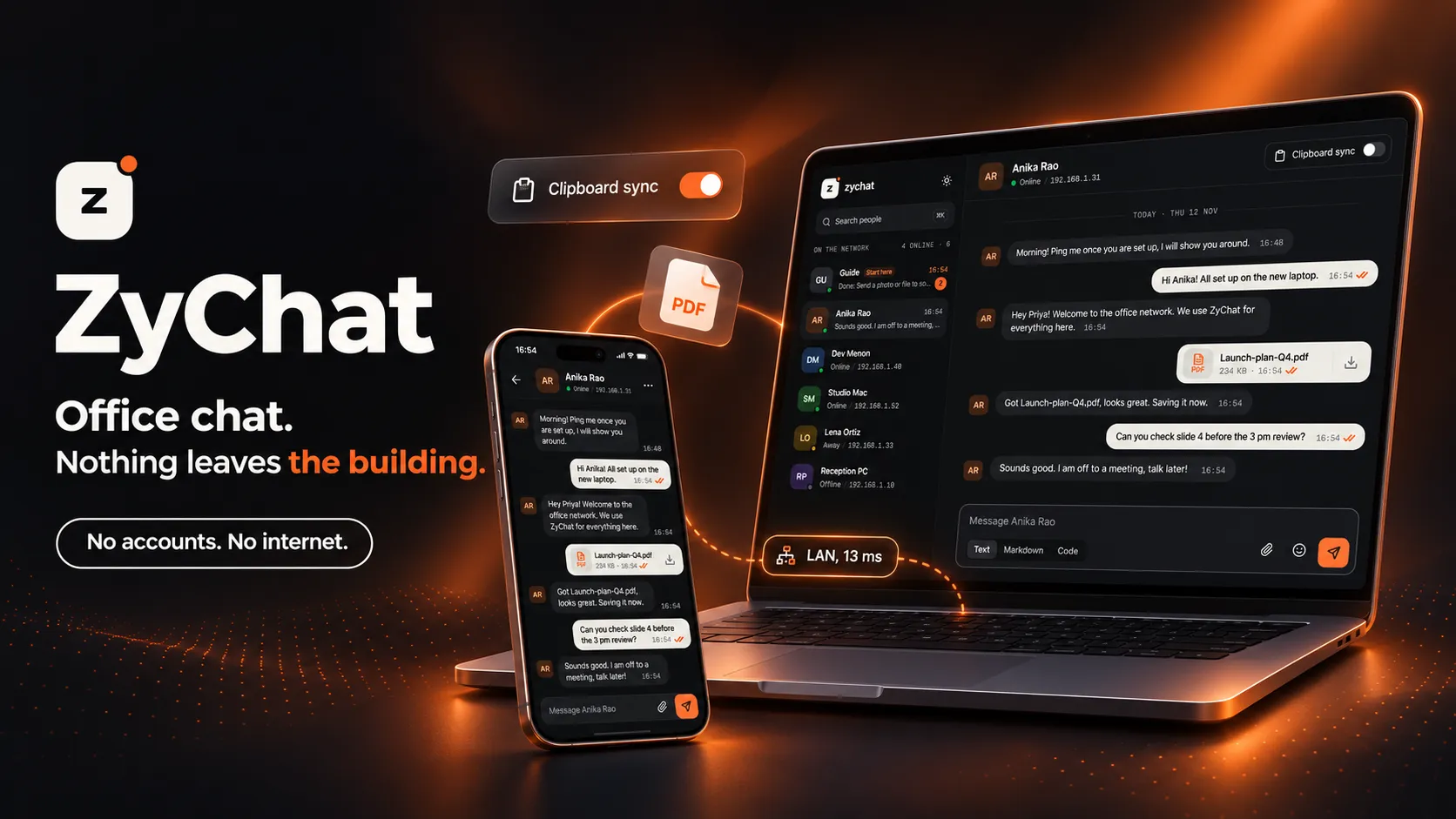
Open ZyChat, pick a name and start talking to anyone on the office network. Messages, files and clipboard move between devices over your own LAN, served from your own machine, with no accounts to create and no internet in the loop.
Try the live demo- No accounts, no passwords
- Runs on your own office server
- Files, photo albums, Markdown and code
- Read receipts, typing and presence
- Live demo runs entirely in your browser
Why office chat usually goes through someone else's cloud
Two people sitting ten metres apart send a file to each other, and it travels out of the building, through a cloud service and back in. Every person needs an account, every new joiner needs an invite, and when the internet drops, so does the conversation. Plenty of teams end up emailing files to themselves just to move them between two desks.
ZyChat keeps the whole thing on the network you already have. One machine in the office runs it, every device with a browser can reach it, and a device is recognised by its address on the network rather than by a login. Nothing to sign up for, and nothing that leaves the building.
What you can try
What you can do in ZyChat
All of it is in the live demo, which runs in your browser with a pretend office of colleagues. The Guide chat pins a short checklist. Start there.
Set up in one step
Type a name, pick an avatar colour, and you are on the network. No email, no password, no invite link.
Everyone on the network
See every device in the office with its address and whether it is online, away or offline, and message any of them from one list.
Text, Markdown and code
Send plain messages, formatted Markdown or code blocks, and see when each one is delivered, read and being answered.
Files and photo albums
Drop in up to 30 files at a time. Photos sit in a row, larger sets open as an album you can flip through and download in one go.
Clipboard sync
Switch it on in a chat and what one person copies lands on the other's clipboard. Handy between two desks, or your own two machines.
Forward and delete
Forward any message, file or photo to several chats at once. Delete for everyone, or just for yourself.
This device and the network
The home screen shows your device, its connection, the server it talks to and the round-trip time, live.
Be two devices at once
Open the demo in a second tab and choose to join as a second device. Message between the tabs and watch each one arrive.
Light and dark
A calm, professional interface in both modes, built to work at desk and phone widths alike.
What you get
What ZyChat gives an office
This is our own product rather than a client build, so what follows is what an office gets from running it, not what an engagement delivers.
- STAYS INSIDE
- Nothing leaves the building
- Messages and files go from device to your own server and on to the other device, all over the office network. There is no third-party cloud holding a copy.
- NO ADMIN
- No accounts to manage
- A device registers once with a name and is recognised again on its own. No passwords to reset, no invites to send, no seats to count when someone joins.
- KEEPS WORKING
- Chat when the internet is down
- ZyChat never needs the internet, so an outage, a slow line or a blocked website changes nothing for the people inside the office.
- FAST HANDOFFS
- Files and clipboard across desks
- Send a whole folder of photos to the next desk at network speed, or copy on one machine and paste on another, without a USB stick or emailing yourself.
How it works
One machine runs it. Every device uses it.
No installs on the devices that chat. Each one just opens ZyChat in its browser.
Run it on one office machine
One commandZyChat starts on any computer on the network that runs Docker, with its database and file storage alongside it.
Open it on each device
SecondsLaptops, desktops and phones on the same network open ZyChat in a browser. Nothing to install on them.
Pick a name
OnceEach device registers with a name and an avatar colour, then everyone else on the network can see and message it.
Switch on HTTPS if you want it
OptionalPlain HTTP works out of the box. For clipboard sync, ZyChat guides each device through trusting its local certificate, step by step.
Is ZyChat right for your office?
Worth reading before you get in touch. It saves you a setup you won't use.
A good fit if…
- Your team works from one office and shares one network
- You want messages and files to stay inside the building
- You would rather not manage chat accounts and invites
- You move files and snippets between desks every day
Probably not, if…
- Your team mostly works remotely, outside the office network
- You need group chats or channels. ZyChat is one-to-one today
- You need chat inside your own product for your customers — see Web & SaaS Development
- You need messages flowing into your other systems — see Integrations & APIs
Frequently Asked
Questions
Common questions about privacy, accounts, files, clipboard sync and running it in your office.
No. ZyChat runs on a server inside your office and every message and file travels over your own network. Devices talk to that server, not to a cloud service, so chat keeps working when the internet connection is down and nothing you send ever leaves the building.
Each device registers once with a name and an avatar colour. After that, ZyChat recognises it again by the id it saved on that device or by its address on the office network. There are no usernames or passwords to hand out, reset or forget.
Plain text, Markdown and code, files of any type, and photos, which show as a row or open as an album you can flip through. Any message can be forwarded to other chats or deleted for everyone. Senders see when a message is delivered and read, and when the other person is typing.
When two people both switch it on in a chat, whatever one of them copies lands on the other's clipboard. It is useful for moving a link, an address or a snippet of text between two desks, or between your own laptop and desktop. Browsers only allow it on secure HTTPS pages, and ZyChat walks each device through trusting its local certificate in a few steps.
It is the same app with the server taken out. In the demo everything runs inside your browser: the colleagues are pretend, your files stay on your device and Reset wipes it all. Open a second tab and you can play a second device and watch messages arrive on both sides.
Yes. ZyChat needs one computer on your office network that runs Docker, and it starts with a single command. Every device with a browser on that network, phones included, can then use it. Get in touch and we will set it up for your office or adapt it to how your team works.
Have a project in mind?
Fixed price after a paid discovery — no hourly billing. A real engineer reads every enquiry, and we reply within 24 hours.