


Zybo AI: Answer the Repeat Questions, Escalate the Ones That Matter
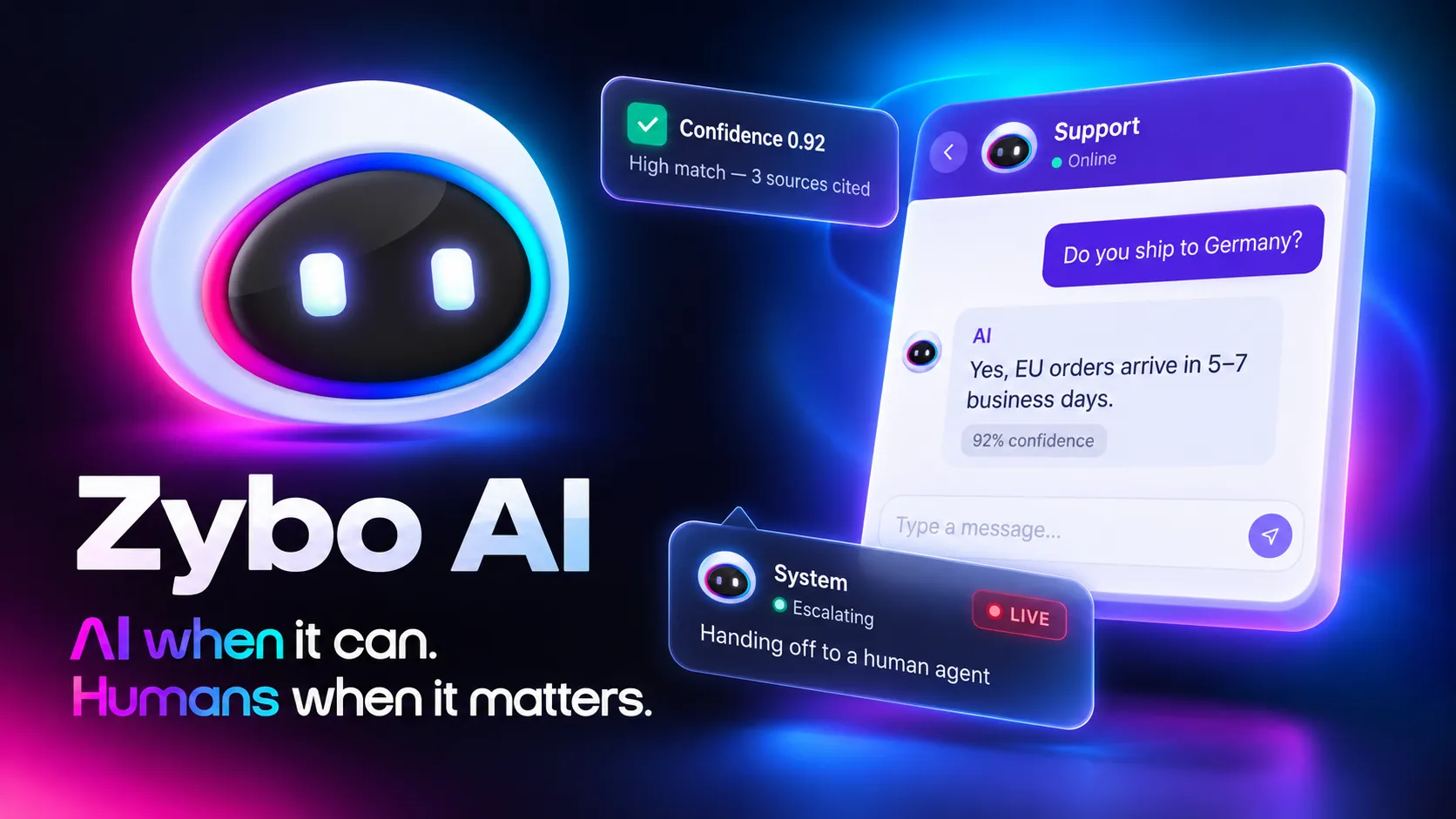
Zybo AI turns your help docs into a chatbot with a confidence score on every reply, then hands hard cases to a human agent inbox. Free tier, no card.

Most support queues are full of questions the answer already exists for. It sits in a PDF, a help page, or a policy doc nobody outside the team can find. Customers ask anyway, and someone on your team types the same reply for the fourth time that week.
The usual fix makes it worse: a bot that answers everything with the same certainty, including the questions it should never have touched. We built Zybo AI to take a different approach. It answers from your own documents, scores how sure it is, and steps aside when that score is low, so the cases that need a person reach one instead of hitting a dead end.
The problem Zybo solves
Two things break support at once. First, repeat questions eat the hours your team should spend on the hard ones. Second, the typical automated answer hides its own uncertainty, so a shaky reply looks exactly as confident as a correct one, and customers only find out it was wrong after they have acted on it.
Zybo addresses both. Anything already covered in your documentation gets answered from those documents, at whatever hour it arrives. What reaches your team is the smaller pile that genuinely needs judgement. And every reply carries a confidence score, so a shaky answer is visible rather than merely confident-sounding.
How Zybo works
Zybo pairs a retrieval-augmented (RAG) chatbot with a human agent inbox. In plain terms: it reads your docs, answers from them, and knows when to hand over.
Build the knowledge base. Upload PDFs, Markdown, CSV, JSON or plain text, or give it your website URL and let it crawl the pages you already publish. The material you have written is usually enough to begin.
Search that finds the passage. Zybo uses hybrid semantic and keyword search with reranking, so a customer asking in their own words still lands on the paragraph that answers them, not a near miss.
See how sure it is. Every reply is scored against how well your documents actually supported it. That score does double duty. It tells the bot when to escalate, and it shows you where the documentation is thin, so you fix the source instead of patching the bot with special-case rules.
Decide how much AI handles. Run Zybo as AI Only, AI plus escalation, or Human Only. You can change your mind once you have read a week of real transcripts, rather than committing up front.
Escalate on purpose. A low-confidence answer hands the thread over on its own. A customer can ask for a person at any point, and a supervisor can pull a conversation across. When the AI steps aside, the agent picks up a thread they can read rather than asking the customer to start again.
Work the agent inbox. Agents claim a conversation, reassign it, or release it back to the queue, so two people never end up answering the same customer. Ownership stays unambiguous.
Give agents a copilot. Even on a human-handled thread, Zybo drafts a suggested reply from your documents. The agent edits it, sends it, or ignores it entirely.
Put the widget on your site. Installation is one script tag. Replies stream as they are generated, with the first token under 100ms, so nobody sits watching a spinner.
Answer from your phone. There are agent apps for iOS and Android, so an escalated conversation does not wait because everyone left the office. WhatsApp, Instagram and Messenger are coming.
Who it is for
Zybo is for teams whose support load is lopsided: a steady stream of questions the docs already answer, plus a smaller set that needs a human. If you recognise the pattern of answering the same thing repeatedly while the genuinely tricky cases sit in the same undifferentiated queue, this is built for you.
It also suits anyone wary of handing customers to a bot that cannot tell when it is wrong. The confidence score and the human safety net exist precisely so you do not have to choose between automation and quality. AI handles what it can, humans handle what counts.
Getting started
There is no setup bill and no card required. You can create an account at app.zybo.ai on the free tier, load a document, and put the widget on a staging page before anyone has to approve a budget.
The path looks like this:
- Sign up (about five minutes). Create an account on the free tier. No card, and no scheduled sales call before you are allowed to look at the thing.
- Feed it your documents (an afternoon). Upload the PDFs and help pages you already wrote, or hand over your website URL and let it crawl.
- Test and set the escalation rules (one to two weeks). Ask it what your customers actually ask, read the confidence scores that come back, and set the level at which a conversation should go to a person.
- Go live and keep reading (ongoing). Drop the script tag on your site, put agents in the inbox, and treat the low-confidence threads as a signal about where your documentation needs work.
Paid plans matter later, once you have outgrown the free tier.
FAQ
What can I use as source material? PDFs, Markdown, CSV, JSON or plain text, or your website URL, which Zybo will crawl.
How does Zybo decide when to involve a person? Each reply gets a confidence score based on how well your documents supported it. Low confidence hands the thread to a human agent. A customer can also request a person at any time, and a supervisor can pull a conversation across.
Do I have to let the AI answer at all? No. You can run in Human Only mode, or AI plus escalation, or AI Only, and switch as you learn.
How hard is it to install? One script tag on your site. Replies stream in, with the first token under 100ms.
Is there a cost to try it? There is a free tier forever, with no credit card required.
Try it
If your team keeps answering the same questions by hand, feed Zybo the docs you already wrote and see what it deflects. Start free at zybo.ai.